TunesToTube vs Typeflick: Which One Actually Grows a Type Beat Channel?
TunesToTube has been around since 2011. That's 15 years of MP3-to-YouTube uploads, which is a long time in internet years. For a lot of producers, it was the first tool they ever used to get a beat onto YouTube without touching video editing software. It's simple, it's free at the basic level, and it does exactly what it says.
The question in 2026 isn't whether TunesToTube works. It does. The question is whether "upload an MP3 to YouTube" is still the right framing for what a type beat producer actually needs to grow a channel and sell beats.
What TunesToTube Actually Does
To be fair to the tool, here's exactly what TunesToTube offers according to its own documentation:
Free tier:
Upload an MP3 + static image, get a video sent to YouTube
Basic title and description input
"Uploaded in HD @ TunesToTube.com" watermark on every video
Limited to roughly 10 uploads per 24 hours for unverified accounts (YouTube's undocumented quota)
Paid tier (upgrade required):
Watermark removal
Batch upload (50 files at once)
Scheduled uploads (future date/time)
WAV and FLAC support
ID3 tag extraction (auto-populates title/description from your MP3's embedded metadata)
Save background image across uploads
SoundCloud simultaneous upload
VP9 codec support for higher audio quality on YouTube
Ad-free experience
It's a lean, functional upload pipeline. The core use case — take audio file, combine with image, send to YouTube — it executes cleanly. Operating since 2011 with 40 million uploads processed is a real data point. The infrastructure is reliable.
Where TunesToTube Stops
The limitations aren't bugs. They're the product's design philosophy: TunesToTube is a file conversion and upload utility. It was never built to be a channel growth tool. That distinction is the entire basis for this comparison.
No AI thumbnail generation. You supply the image. TunesToTube takes it as-is and uses it as the video background. There's no thumbnail creation, no visual optimization, no AI-assisted image generation matched to your genre. If you upload a low-quality image, a poorly cropped photo, or an inconsistent visual compared to your other uploads, TunesToTube processes it without comment.
No SEO metadata generation. TunesToTube can extract ID3 tags from your MP3 (artist name, track title) and drop those into your YouTube title and description — but that's it. The resulting title is whatever you named the MP3 file, not an SEO-optimized type beat title structured for YouTube search ranking. There's no keyword research, no title formula, no description optimized for the "Drake type beat 2026" search intent that actually drives discovery.
No niche analysis. There's no tool inside TunesToTube to help you decide which artist to target, which keywords have search volume, or which niches are over- or undersaturated. That research happens elsewhere, manually, before you ever open TunesToTube.
The watermark problem. On the free tier, every video carries "Uploaded in HD @ TunesToTube.com" visibly embedded in the frame. For a producer trying to build a professional channel that artists trust enough to spend money on, a third-party service watermark in the bottom corner of every video is a branding problem. It removes the upgrade requirement, but the paid tier is specifically gated behind it.
The upload cap reality. TunesToTube's own FAQ states: "YouTube doesn't document exactly how many video uploads are allowed each day, but it's speculated it is 10 videos for unverified accounts, and 30 videos a day for verified accounts." A producer uploading 5 beats per week won't hit this wall. A producer trying to batch-deploy a backlog of 40 unpublished beats will. The 10-video-per-24-hours limit has been a consistent complaint in YouTube's own support forums, where producers describe workflows grinding to a halt mid-batch.
No scheduling on the free tier. Scheduled publishing — the ability to set a future date and time for each upload — is a paid feature. For producers who batch their work and want to space out releases over a week at optimal posting times, the free tier requires manual logging back in to publish each video at the right moment.
What Producers Are Actually Saying
The frustration with TunesToTube's limitations shows up consistently in the same places producers discuss tooling.
On YouTube's own support forum, a thread titled "Suddenly my number of uploads with TunesToTube is limited to 10 per 24 hours" generated significant activity — producers discovering mid-workflow that their batch had hit an invisible ceiling with no warning and no clear reset time.
On AlternativeTo, the TunesToTube listing has generated enough alternative-seeking traffic that multiple competing tools have built dedicated comparison pages targeting "TunesToTube alternative" as their primary keyword. The producer community has been actively looking for something that does more.
The competitor comparisons that exist are consistent in what they identify as TunesToTube's gaps: per-upload charging on some plans, upload caps, watermarks on the free tier, and the absence of any SEO or growth tooling beyond basic metadata.
One consistent theme in producer communities: TunesToTube is fine for getting started, but as soon as a producer starts thinking about their channel as a business rather than a filing system, the tool stops covering what they actually need.
What Typeflick Does Differently
The distinction isn't about upload mechanics. Both tools get your audio onto YouTube. The distinction is about what happens around the upload — the packaging layer that determines whether a video gets discovered, clicked on, and converted into a beat sale.
AI thumbnail generation matched to genre. Upload your audio file and Typeflick generates three thumbnail options matched to your beat's genre (Dark Trap, R&B, Lo-Fi, Drill, and more). You select one. No Canva, no Photoshop, no sourcing artist images, no spending 20-45 minutes per thumbnail — which is the actual time cost most producers report when doing this manually. The thumbnails maintain visual consistency across your catalog, which is the compounding advantage of a branded channel system.
SEO-optimized metadata generated automatically. Typeflick produces titles, descriptions, and tags structured for YouTube search ranking — not just whatever was in the ID3 tag of your MP3. The difference matters: "Drake Type Beat 2026 - 'Midnight' | 21 Savage Type Beat | Hard Trap Instrumental" ranks for three separate searches. "Drake - midnight 140bpm" (extracted from an ID3 tag) ranks for none of them.
Niche & Artist Explorer. Before you upload, Typeflick's built-in niche analysis tool shows search volume by artist or style, competition scores, and opportunity ratings. The tool shifts from reactive (upload what you made) to strategic (make and upload what has search demand). This is the difference between catalog building and catalog guessing.
Scheduled publishing, included. Set a future date and time for each upload. Batch multiple beats in one session, schedule them to go live over the following days at optimal times. The channel stays active and consistent without requiring daily manual publishing.
No watermark. Your videos are yours. No third-party branding in the frame.
The Direct Comparison
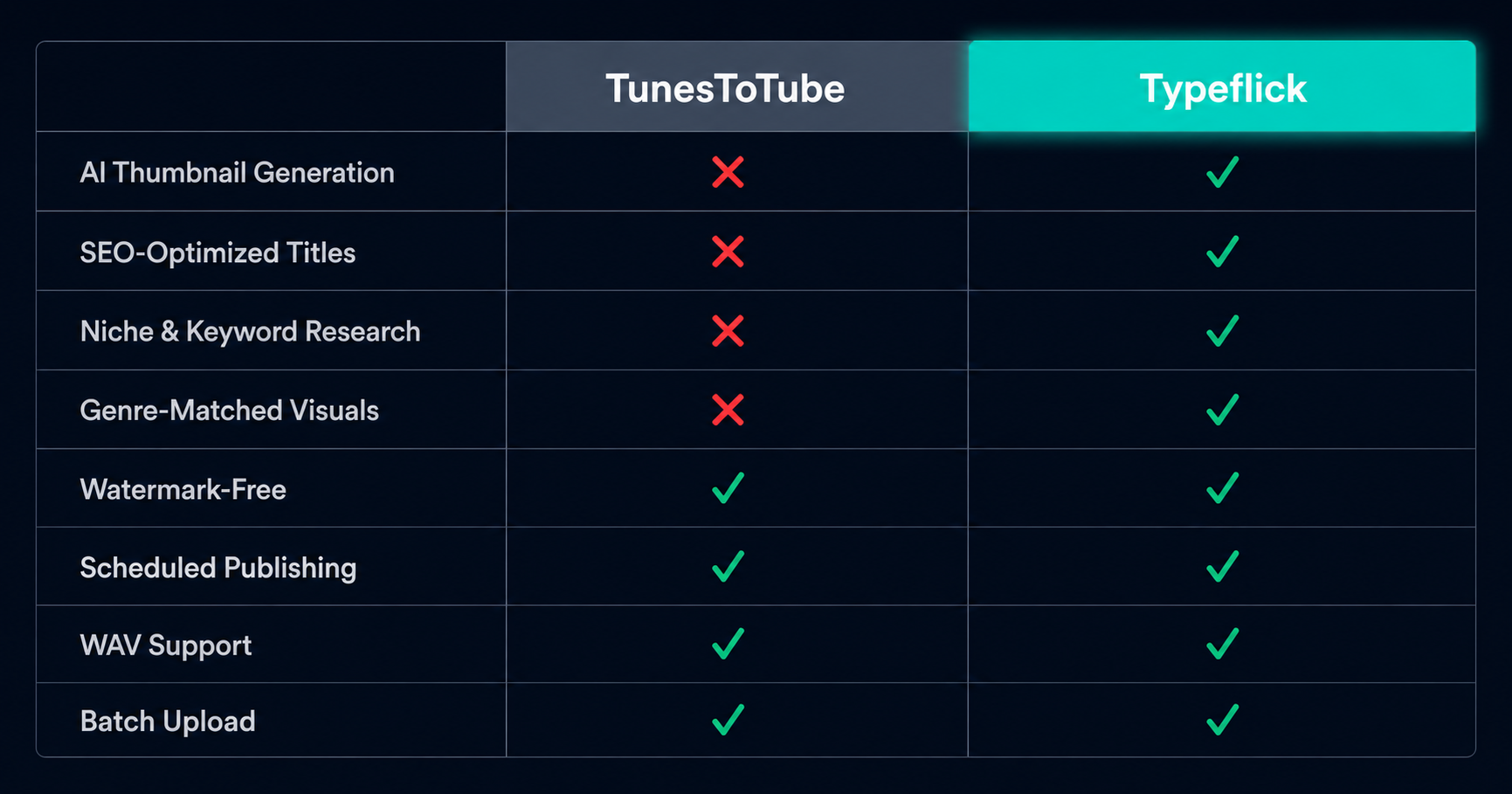
The bottom half of that table is the real conversation. TunesToTube and Typeflick are comparable on the upload mechanics. They're completely different tools when it comes to everything that determines whether an upload actually performs.
Which Tool Is Right for You
TunesToTube makes sense if you need to upload a few tracks occasionally, you already have a design workflow for thumbnails and a separate SEO process for metadata, and you want the simplest possible upload pipe without adding another subscription. The free tier works for low-volume use cases, and the paid tier adds the scheduling and batch features that frequent uploaders need.
Typeflick makes sense if you're running a type beat channel seriously — posting 3-5 times per week, trying to build a catalog that ranks in search, and finding that the packaging work (thumbnail, SEO, scheduling) is eating time that should be in the studio. The entire value proposition is that the packaging pipeline runs automatically, on every upload, consistently, so the operational overhead doesn't cap your output or force quality trade-offs.
The honest framing: TunesToTube solves the problem of getting audio onto YouTube. Typeflick solves the problem of building a type beat channel that grows. If you only need the first, TunesToTube does it fine and has 15 years of uptime to prove it. If you need the second, TunesToTube stops at the point where the actual work of channel growth begins.
Keywords: TunesToTube alternative, TunesToTube vs Typeflick, best tool for type beat producers YouTube, type beat video upload tool 2026, TunesToTube limitations, beat channel automation tool